Your family's command center

Chores, calendar and rewards. One calm home base.

Kids check off chores and earn Hugs to spend in a reward shop you fill. You give the OK, keep the family calendar, and stop being the one who remembers everything.

Works on the phones, tablets and computers you already have, plus Alexa. Or peek at a sample family.
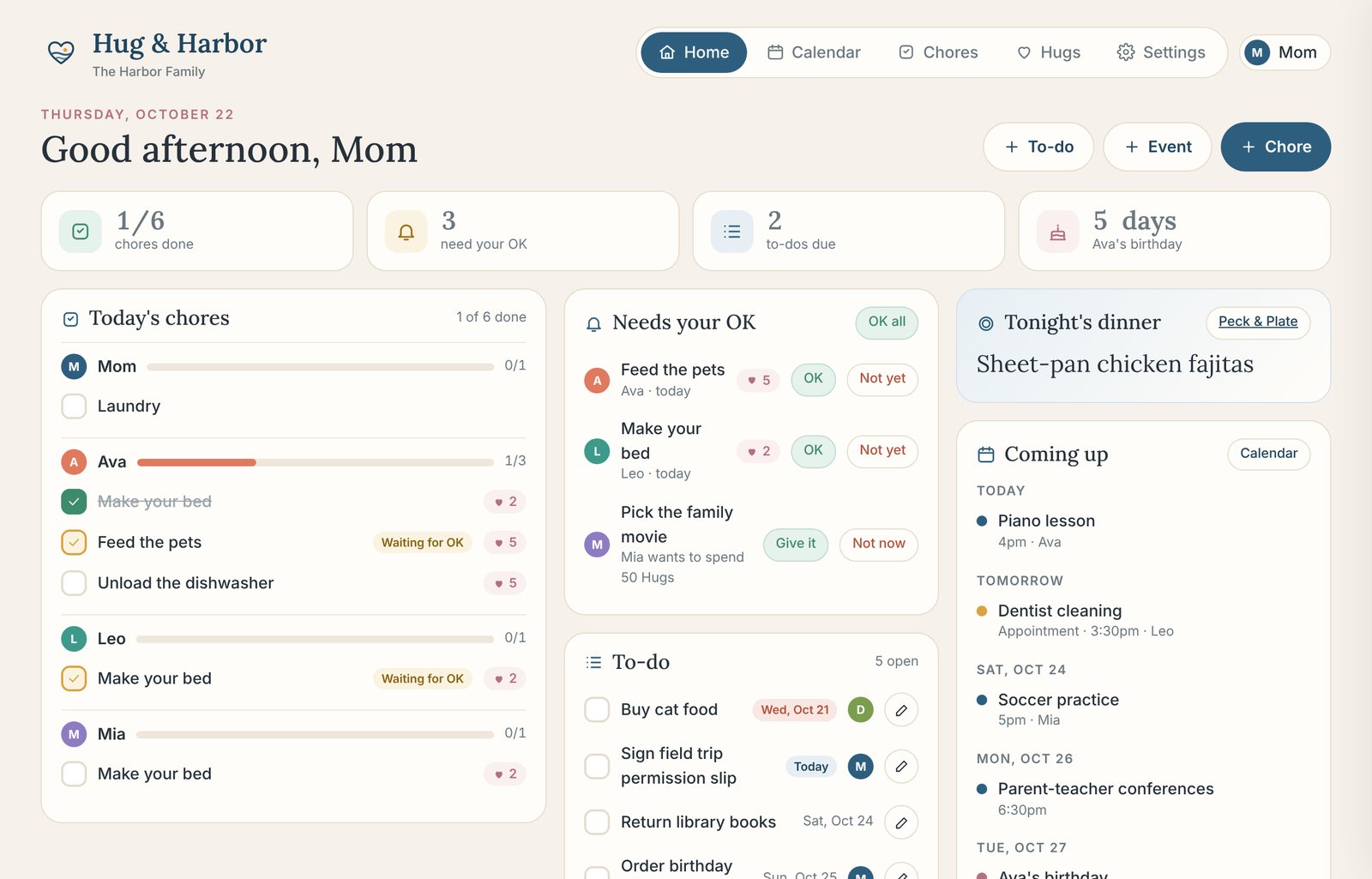
Hug & Harbor home screen with today's chores, approvals, to-dos, tonight's dinner and what's coming up
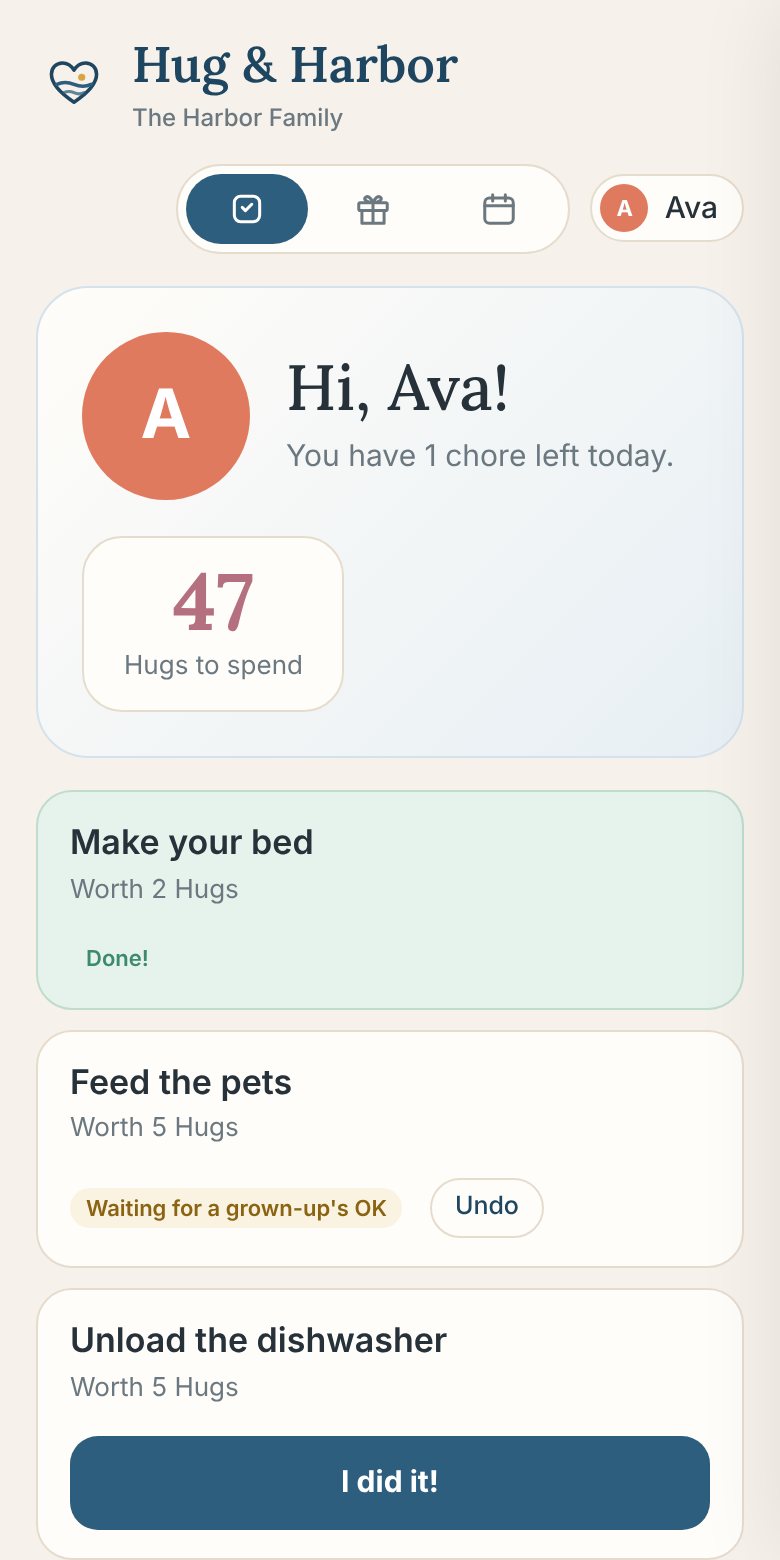
A kid's screen showing their chores and Hugs to spend
"Alexa, ask Hug and Harbor what's on today."
No screen to buyKids don't need emailEvery phone stays in syncWorks with Alexa
See it in action

One minute, one calmer home.

The home screen, grown-up approvals, the family calendar, a kid's own screen, the reward shop and Alexa.

How it works

Less nagging. More hugs.

Set it up once in about a minute, then let the routine run itself.

1

Set the chores

Daily, certain days, or taking turns between kids. Pick how many Hugs each one is worth, or start from our ideas.

2

Kids tap "I did it!"

Each kid gets their own simple screen on any phone or tablet. Or they just tell Alexa.

3

You give the OK

Hugs land once a grown-up approves. Kids save up and ask for rewards you choose, like screen time or picking the movie.

Everything in one place

All the moving parts, finally together.

Chore charts

Daily, weekly or rotating chores for every kid and grown-up, with progress at a glance and an optional phone reminder if it isn't done yet.

School, sorted NEW

Snap a photo of a teacher's email, a flyer or an assignment sheet. Homework, school events and notes land with the right kid after you approve, and kids check off their own homework.

Hugs & reward shop

Kids earn Hugs for chores and save up for rewards you set. You can also give bonus Hugs anytime.

Grown-up approvals

Finished chores and reward requests wait for your OK. Grown-ups have a PIN; kids don't need one.

Family calendar

Events, appointments and each kid's chores, color-coded. Bring in Google or school calendars too.

Birthdays & appointments

Never miss a dentist visit or a birthday. Get a phone reminder an hour before, the night before, or that morning.

Shared to-dos

Permission slips, library books, the furnace tune-up. Assign it, date it, check it off.

Tonight's dinner

Plan meals in Peck & Plate and dinner shows up right on your home screen.

Works with Alexa

Hear the day out loud, add to-dos, check Hugs, and let kids check off chores by voice.

Already have a wall screen?

Send birthdays, appointments and events to Skylight, Hearth, Google or Apple Calendar with one private link.

Made for kids

Their own simple screen.

No email, no password, nothing to figure out. Kids pick their name, see just their chores, and tap "I did it!" Then they watch their Hugs grow.

  • Optional kid PINs, so siblings can't check off each other's chores
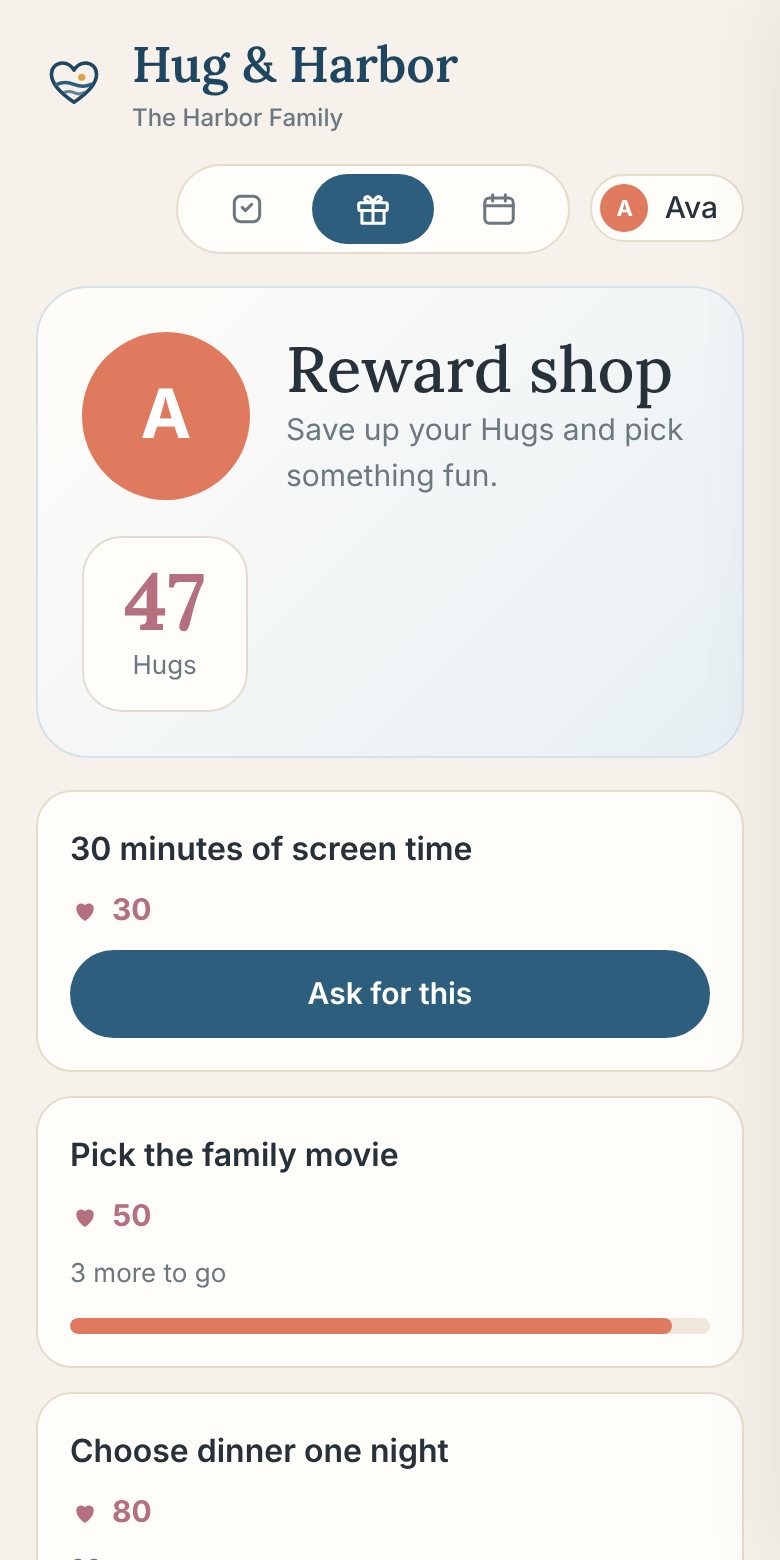
  • A reward shop with progress bars ("3 more to go!")
  • Upcoming chores for the week, so nothing's a surprise
Kid's chore screen
Kid's reward shop
For the grown-ups

The whole month, in color.

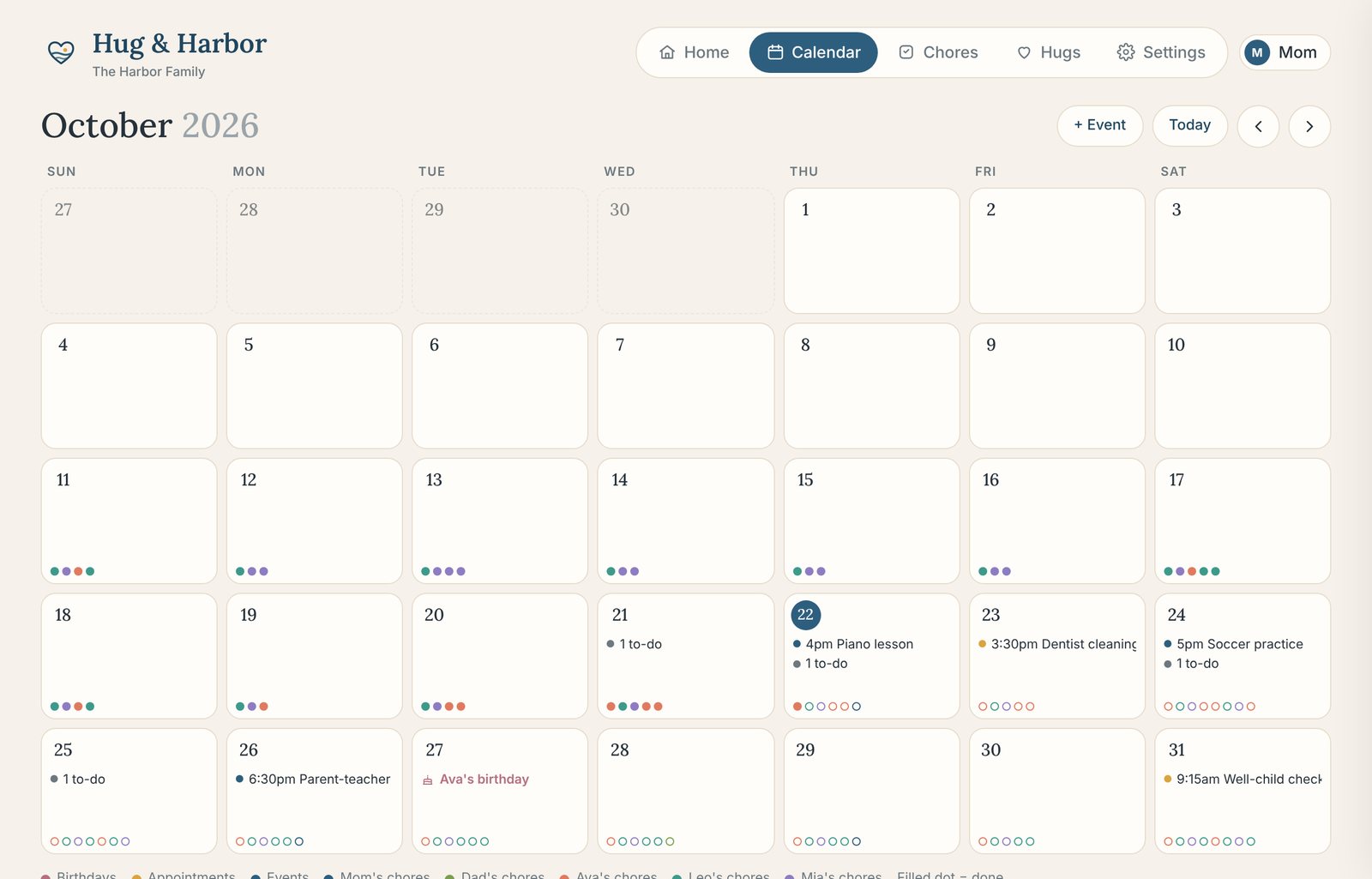
Every appointment, birthday, event and chore on one calendar, with a dot for each kid. Tap a day to see everything that's happening.

  • Bring in Google Calendar or the school calendar
  • Two grown-ups, one plan, synced on every phone
  • Send it back out to Skylight, Hearth or Apple Calendar
Family calendar month view with color-coded events and chores
Works with Alexa · early access

Just ask.

Hug & Harbor has its own Alexa skill. Connect it once with a 6-digit number, and the whole family can use it from the kitchen.

  • "What's on today?" and "what's coming up?"
  • "What chores does Ava have?"
  • "Add milk to the to-do list"
  • "How many Hugs does Leo have?"
Alexa, ask Hug and Harbor what's on today.
Good morning! Today there's piano lesson at 4 PM. Mia still needs to make her bed. Tonight's dinner is sheet-pan chicken fajitas.
Alexa, tell Hug and Harbor I made my bed.
Nice job, Mia! I sent make your bed to a grown-up for an OK. That's 2 Hugs once it's approved.
How it compares

Everything they do, without the wall screen.

Most family organizers make you pick: a calendar or a chore chart, a subscription or a $160+ screen. Hug & Harbor brings it together on the devices you already own.

AppYearly priceScreen to buy?Best known for
Hug & HarborYou are here$79.99No. Any phone, tablet or computerChores, Hugs & reward shop, approvals, family calendar, school homework and events read from a photo, birthdays, to-dos, dinner and Alexa, in one app
Hearth DisplayAbout $86 membershipYes, the Hearth DisplayWall-mounted family calendar, routines and meal planning
Skylight Calendar$39–79 for Skylight PlusYes, about $160–600Wall calendar with chore charts; star rewards and meal planning need Plus
S'moresUp$99.99NoChores with points and rewards
JoonFrom $89.99NoA chore game for kids ages 6–12
Cozi GoldAbout $39+NoShared family calendar and lists

Prices from each company's public listings and app store pages, October 2026. They may change.

Pricing

One plan for the whole family.

Unlimited kids, grown-ups and devices. Billed once a year. Cancel anytime.

Hug & Harbor

The family command center
$79.99 / year
About $6.67 a month
  • Chore charts & rotations
  • Hugs & reward shop
  • Grown-up approvals
  • Family calendar, birthdays & appointments
  • School: homework & events from a photo
  • Shared to-dos
  • Phone reminders
  • Alexa skill
Most popular

Home & Table

Hug & Harbor + Peck & Plate meal planning
$119.99 / year
About $10 a month
Save $30
  • Everything in Hug & Harbor
  • Peck & Plate: your meals on a calendar
  • One shopping list, sorted by aisle
  • Import recipes from any link or photo
  • Tonight's dinner on your home screen

The Whole Harbor

All three apps for a healthier, calmer home
$149.99 / year
About $12.50 a month
Save $40
  • Everything in Home & Table
  • Bushel & Tap: simple whole-food habit tracking
  • Hand-portion logging, no calorie counting
  • Fiber, protein and water goals
  • What you log shows on your meal calendar

Secure checkout with Stripe. Have a promo code? Add it at checkout.
Digital purchase, so all sales are final. Cancel anytime to stop renewal. Details

Questions

Good to know.

Do I need to buy a screen or tablet?

No. Hug & Harbor runs in the browser on the phones, tablets and computers you already have. Add it to your home screen and it opens like an app. Got an old tablet in a drawer? It makes a great kitchen command center.

Do my kids need an email or their own phone?

No. Kids just pick their name on any shared device. You can give them an optional 4-digit PIN so siblings can't check off each other's chores.

How does School work?

Turn on School in Settings. Snap a photo or screenshot of a teacher's email, a flyer or an assignment sheet, or paste the email text. Hug & Harbor finds the homework, due dates, school events and notes, guesses which kid each one is for, and waits for you to approve. Approved events go on the family calendar, and kids check off their own homework (with Hugs if you like). Ask Alexa what's due tomorrow, too.

How do Hugs and approvals work?

You choose how many Hugs each chore is worth. When a kid taps "I did it!", it waits for a grown-up's OK, then the Hugs land. Kids spend them in a reward shop you fill with things like screen time, picking the movie or a trip for ice cream. You can turn approvals off if you'd rather count them right away.

Can my partner use it too?

Yes. Add as many grown-ups and kids as you like. Everyone opens the same household with your household code, and changes sync across every device.

How does the Alexa skill work?

The Alexa skill is in early access while Amazon reviews it, and members get an invite to turn it on. Once it's on, say "Alexa, start Hug and Harbor," and enter the 6-digit number it reads you in Settings. Then ask what's on today, what chores are left, add to your to-do list, check Hugs, or let kids tell Alexa when they've finished a chore.

Can I try it before I buy?

Yes. Peek at a sample family to click around every screen. Nothing is saved, and there's nothing to sign up for.

What are Peck & Plate and Bushel & Tap?

They're our sister apps. Peck & Plate puts your meals on a calendar and builds one shopping list sorted by aisle. Bushel & Tap is a simple whole-food habit tracker using hand portions instead of calorie counting. The bundles include them at a discount, and they connect to each other.

Will it remind us?

Yes. Turn on notifications on each phone or tablet in Settings, and choose what that device gets: chore reminders at the time you set, "needs your OK" alerts when a kid finishes a chore, "you earned Hugs" for kids, and reminders for appointments, events and birthdays. On iPhone, add Hug & Harbor to your Home Screen first.

Can I cancel?

Anytime, in Settings under Manage billing. You keep access through the end of the year you've paid for, and everything you set up is saved if you come back.

Is our family's information private?

Yes. We don't sell your data or show ads. Kids only need a first name. Read our privacy policy.
Home, held together.

Give everyone a place to see what's next, and give yourself a break from being the reminder.

See plans